
The information provided here pertains to the AO Inner-Voice Scan Audio email sent to the subject of the Inner Voice scan.
Email Reports
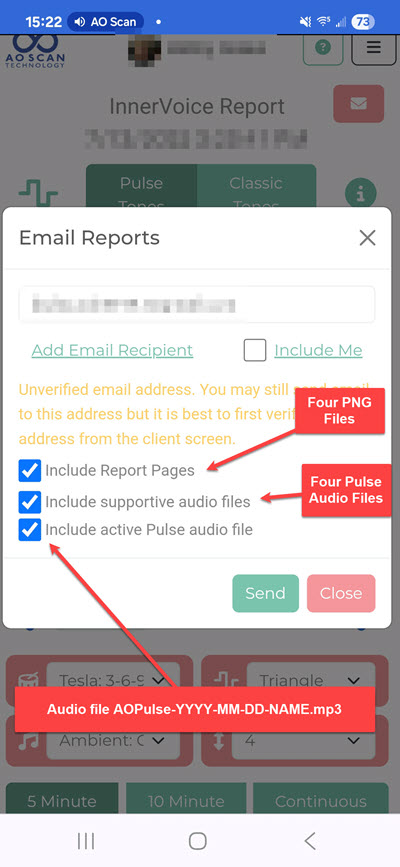
After running the Inner Voice scan, you are able to email the results to the client’s email list in the Email Reports window. You may additionally add another email recipient (Add Email Recipient) and send yourself (Include Me) a copy of the emails.
- Include Report Pages: Selecting this checkbox will include the seven (cover page, Inner Voice info, how to use, and the four supportive tone information) PNG files in the AO Inner-Voice Scan Report email (see Inner Voice Report Without Vital Scan and Inner Voice Report With Vital Scan).
- Include supportive audio files: Selecting this checkbox will send a second email, the AO Inner-Voice Scan Audio email.
- Include active Pulse audio file: Selecting this checkbox will cause the AOPulse-YYYY-MM-DD-NAME audio file to the generated and included in the AO Inner-Voice Scan Audio email.
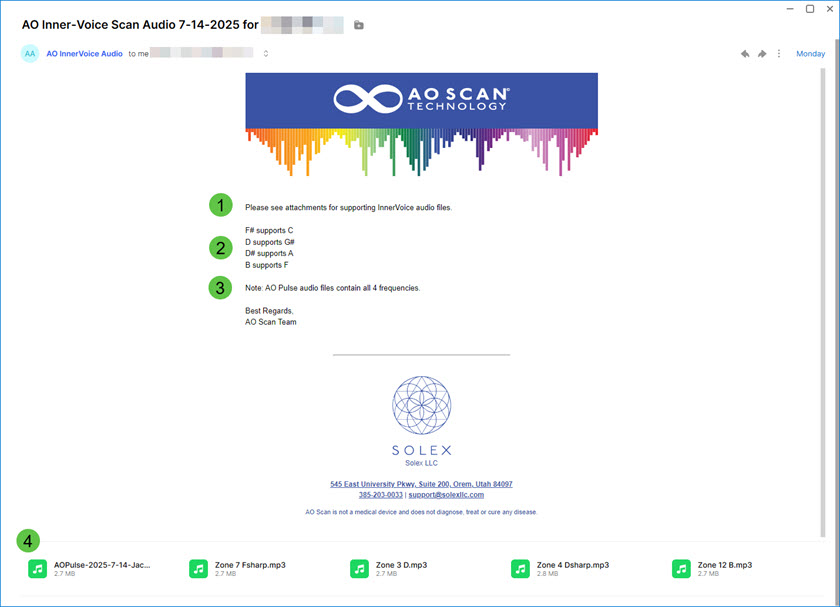
There are four aspects of the AO Inner-Voice Scan Audio email for you to be aware of.
- Draws you attention that the four AO Pulse audio MP3 files are attached [4] to the email.
- Listing of the tones (e.g., F#, D, D# and B) that support those frequencies (e.g., C, G#, A and F) that are the most out of range.
- A reminder that there are four AO Pulse Supportive Tone audio MP3 files attached [4] to the email.
- The four AO Pulse Supportive Tone audio MP3 files attached to the email. If the active Pulse audio file was selected to be included in the email (see Email Reports image above) , then that MP3 file will also be attached. These can be used as the primary means to listen to the Supportive Tone audio files, or when you do not access to the Internet. Alternatively, you may use the AO Inner-Voice Scan Report link to access to the AO Inner-Voice Scan Report in a browser.
AOPulse-YYYY-MM-DD-NAME.mp3 File
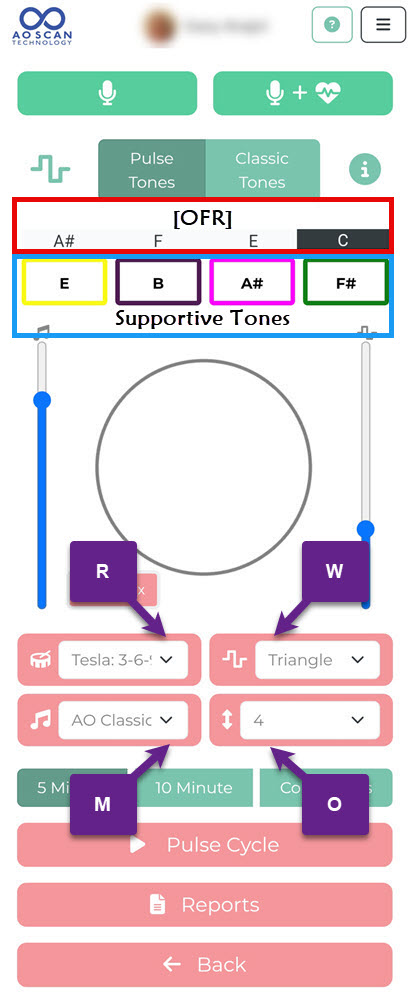
The AOPulse-YYYY-MM-DD-NAME.mp3 file contains all four Supportive Tones from your Inner Voice scan, and the four tones are played together using the settings on the Pulse Tones interface. This MP3 file accurately reflects the waveform [W], rhythm [R], music [M], and octave [O] settings chosen when the email was sent. Once sent, those tone settings are locked into that audio file. This file provides a convenient way to listen to all four balancing tones in one file using your chosen Pulse Tone settings.
[OFR] The first three frequencies are the ones that are the most out of range, and the last one is the one being suppressed the most.
 Salubrious Sounds