Contents
- How often do I use Quick Scan?
- What headset do I use during Quick Scan?
- Quick Scan
- How To Scan
- References
- Quick Scan, EZ Scan, Loading Supplements and Therapies Into Your Scanner
The Quick Scan technology performs Morning, Midday, and Evening scans. As part of the process, supplements and therapies can be uploaded and utilized in your morning, midday, and evening routines. In addition, Quick Scan offers a Custom Scan and a Pet Scan.
The Quick Scan process uses a sound harmonizing technique that generates a balancing audio frequency. The results provide a frequency recording that balances your current emotional state. Low and high octaves will be the frequencies that are out of range. This technology feature allows you to upload and add your supplements and therapies so the frequencies associated display in your scan results.
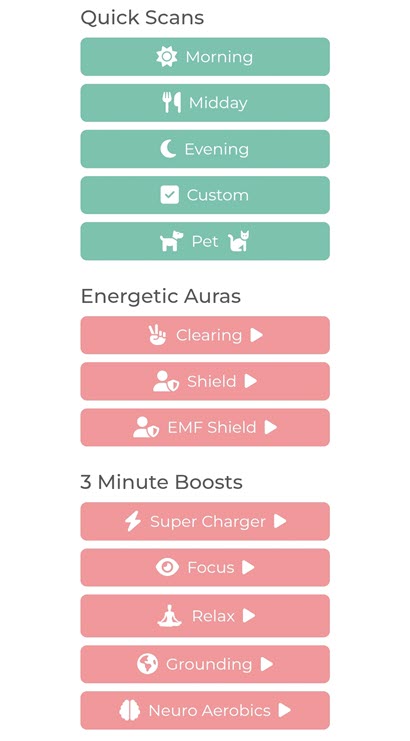
The Quick Scan also has energetic frequencies for clearing and shielding your state of balance and energy. Clearing allows you to eliminate negative vibrations from your surroundings. Shielding protects you from any negative vibrations or energy that may be around you. In addition, Quick Scan conducts 3 Minute Boost sessions to optimize your energetic state for various needs such as Super Charger, Focus, Relax, Grounding, and Neuro Aerobics.
How often do I use Quick Scan?
Each scan: Morning, Midday, Evening, Custom, and Pet is designed to be performed once each day. The additional features in Quick Scan, the Energetic Auras, and 3 Minute Boosts can be performed multiple times a day as needed. However, this is not a fixed guide for every user and should be performed depending on the users’ individual needs.
What headset do I use during Quick Scan?
For Morning, Midday, and Evening Scans, we recommend using both your Bone Conducting Transducer Headset and your earphones. For a Custom Quick Scan, we recommend using your Bone Conducting Transducer Headset, while the 3 Minute Boosts Quick Scans only need earphones. Both the Pets and Energetic Auras Quick Scan don’t require any headsets.
Quick Scan
Before running a Quick Scan, you may wish to add some supplements and therapies, yours or your clients, to your library. To access the supplement library, tap on your client profile name at the top of the screen and select Supplements/ Therapies from the menu. See the Quick Scan, EZ Scan, Loading Supplements and Therapies Into Your Scanner video that will show you how.
Drink some water, then click next. It will prompt you to record your voice. If you look at the record button, you’ll see a small heart to the left of the word ‘record.’ This indicates that the system will not only analyze your voice but also perform a quick vital scan. While it won’t provide a complete assessment of all your vitals, it will give enough information to help determine where to start today.
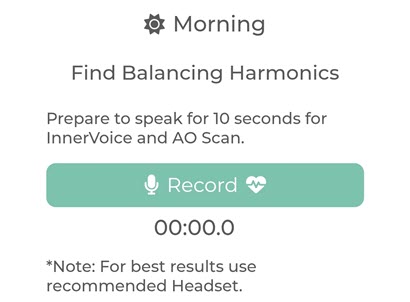
- Ensure that you put on your bone-conducting headset and adjust its position so that the coils rest on the bone in front of your ear. Begin the scan by selecting which scan you desire to complete under the Quick Scan section.
- Select which supplement categories to run with the scan and tap next. These are the supplements added to your, or your client’s, supplement library.
- When you are ready to begin the scan, place your headset on and select the “Record” button.
- Speak for 10 seconds, starting with announcing your name i.e., “l am (Your Name)”. Use regular headphones to listen to the audio harmonics. The most important part is “I am” and your name. This is crucial because it validates you and your vocal cords. Everything is now in place for your true emotional state to be recorded.
- You may use regular headphones to listen to the audio harmonics.
Two colors are now evident in your results. We are examining four frequencies. Three of these frequencies are notably above your baseline, while one frequency is below it, indicating your lowest frequency. In this Quick Scan, we will concentrate solely on the highest and lowest frequencies. The highest frequency reflects the emotion for which we tend to overcompensate, while the lowest point signifies the emotion we endure, often without even being aware of it. This can originate from experiences as early as our time in the womb or during early childhood. However, that emotion is likely the one that brings us the most grief in life.
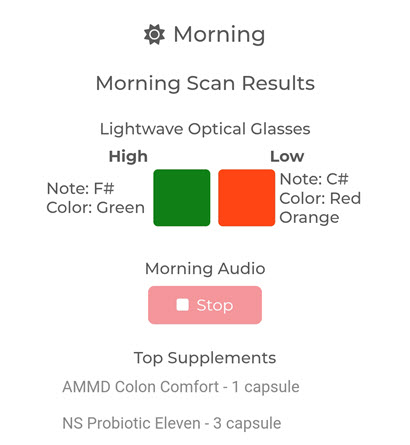
Click the “Play” button, and the appropriate music with the frequencies you need to hear will play for 3 minutes. Based on your body’s frequencies, you should spend 15 minutes viewing with the two colored glasses indicated.
Quick Scans
Morning, Midday, Evening
See How to Scan.
Custom
The custom scan is not restricted to AM or PM; it can be performed at any time of day or night. A custom scan is designed for when you feel the need for a scan. In contrast, when you conduct a morning, afternoon, or evening scan, it will only analyze the supplements in your library that fall under those specific categories.
See How to Scan.
Pet
See How to Scan.
Energetic Auras
Begin the scan by selecting the ‘Clearing’, ‘Shield’, or ‘EMF Shield’ option under the ‘Energetic Auras’ section. Each of these processes takes about 20 seconds. If you are scanning multiple clients throughout the day or scanning yourself at different times, it is advisable to perform a clearing first, followed by a shield, and then proceed with your scan.
See How to Scan.
Clearing
Clearing the energies around us and removing the energies we’ve accumulated, which might include negative feelings. Clearing is a specific matrix of frequencies that neutralizes energies or frequencies that are not inherent to us. It doesn’t affect your own; it simply eliminates those we’ve collected.
See How to Scan.
Shield
Then there’s shielding, which is essential when you’re working with clients. When interacting with others, you want to ensure their energies and frequencies don’t affect you. The first thing you should do is sit down and clear your mind, and then shield yourself.
A shield is essentially an energetic barrier that surrounds us. While this may sound strange, especially for first-time users of frequencies, it’s quite relevant. You’ve been to places where you felt comfortable and others where you didn’t, and it’s all about the energies present. Our goal is to give you the ability to optimize your state of mind and your physical being to be in the best possible frequency state.
See How to Scan.
EMF Shield
TBS
See How to Scan.
3 Minute Boosts
While wearing the earphones, begin any of the 3 Minute Boost audios by selecting any option under the ‘3 Minute Boost’ section. The options available include Super Charger, Focus, Relax, Grounding, and Neuro Aerobics.
The “3-Minute Boosts” are a set of or matrix of frequencies that are geared to bring the brain wave activity down into the Theta, high Theta, Low Alpha state where you’re not sleeping. You’re receptive to inspiration, and you’re creative at the same time.
Super Charger
TBS
Focus
TBS
Relax
Relax will bring you down into a meditative state.
Grounding
Grounding is one of those things where you just can’t seem to get in sync with your daily activities. When things aren’t going the way they need to, take three minutes to sit down, drink some water, and listen. They’ll help you settle down emotionally and mentally.
Neuro Aerobics
Neuro Aerobics is very similar to Supercharge in that it stimulates the brain, but, as the name suggests, it’s more like doing aerobics for the brain. The sounds and frequencies behind it are just getting your synapses to fire.
How To Scan
References
“Quick Scan.” 2024. Solex. Accessed November 24. https://www.solexglobal.com/quick-scan.
“Quick Scan | Basic Training.” 2025. YouTube. YouTube. Accessed February 17. https://www.youtube.com/watch?v=Ra_BTG5onUI.
LLC, Solex. 2022. “How Can I Use Pet Scan for My Pet.” Solex. Solex. August 2. https://www.solexglobal.com/blog/how-can-i-use-pet-scan-for-my-pet.
Quick Scan, EZ Scan, Loading Supplements and Therapies Into Your Scanner
Time / Subject
7:56 / Quick Scan In Depth
19:14 / EZ Scan In Depth
24:12 / Loading Supplement/Therapies Library
The featured image on this page is from the WallpaperAccess website.
 Salubrious Sounds