
Contents
Inner-Voice Instructions
To use the Inner-Voice Scan, you must speak into your device’s microphone. To do this, simply hold the microphone close to the side of your face as if you were making a call.
- At the top of the screen, you will have two options to scan your voice. The button on the left with a Microphone icon will scan only your voice. The button on the right with the Microphone + Heart icons will scan your voice and your vitals. Select the one you desire to scan.
- If you choose to only scan your voice, you will need to speak into the phone for 10 seconds, starting by announcing your name. For example, “l am [first name] [last name].” If you choose to scan your voice and vitals, you must first put your headset in place before beginning the scan. You will then speak into the phone for 10 seconds, starting by announcing your name. For example, I am [first name] [last name].’ After your voice is scanned, you will automatically transition into scanning your vitals.
Tones
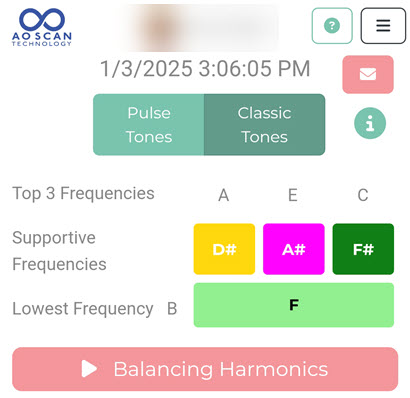
Classic Tones (original)
The Classic Tones button will analyze approximately 2000 frequencies. The AO Scan will display the three frequencies with the highest and lowest out-of-range frequencies. Then, it will give you some basic information on those tones. Each tone you wish to hear lasts for 3 minutes when you listen to the tone.
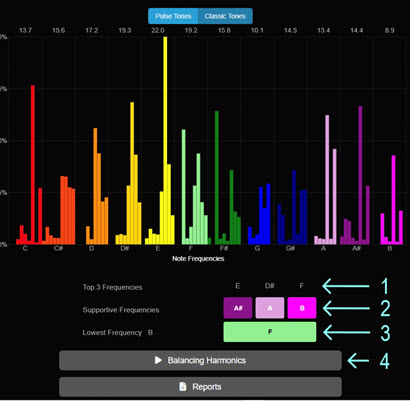
The program will provide the following results underneath the graph when the recording is complete.
- Top 3 Frequencies (e.g., A, E, and C).
- The Supportive Frequencies for the Top 3 Frequencies (e.g., D#, A#, and F#).
- The Lowest Frequency (e.g., B) and its Supportive Frequency (e.g., F). (You can individually select and play the Supporting Tones for each Supporting Frequency. Earphones are essential when listening to the tones.)
- Tap the Balancing Harmonics button and listen to your Balancing Frequencies using your earphones. The audio is about 12 minutes long. To pause the audio, tap the Balancing Harmonics button while it is playing.
Pulse Tones (default)
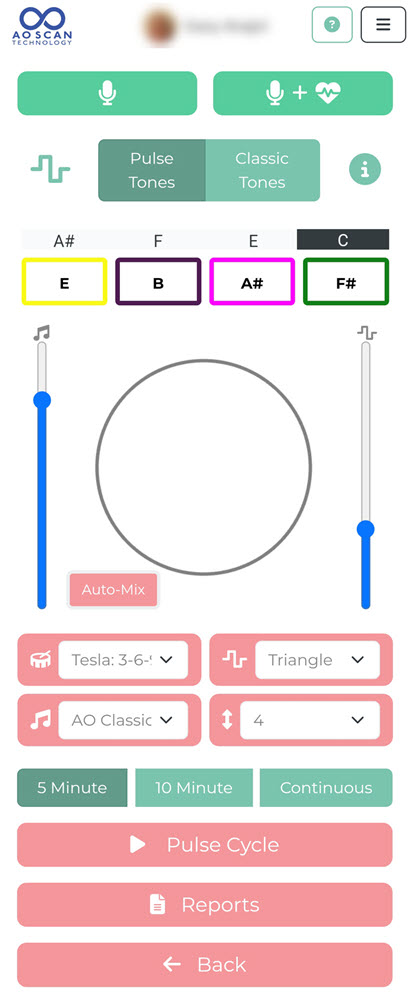
This view offers a more customizable option for listening to the Balancing Frequencies.
To start, push the Microphone (default), or push the Microphone + Heart if you want to do a Vital Scan with the Inner Voice. But for now, we’re just going to talk about using the Microphone.
When you click the Microphone button, AO Scan analyzes almost 10,000 frequencies, of which 2000 are relevant to your voice at that time. Now, those 2000 frequencies could be a different set of frequencies in that 10,000 range each time. However, only about 2000 of them are relevant at the moment you do your Inner Voice. We can see deeper into how those emotions affect your physical side.
The Inner Voice is like the eyes of the window to the soul. Your voice is the window to everything going on in your body.
This is so important to know because our emotions determine our physical health, and it is important that we pay attention to those emotions.
How many times should you do an Inner Voice? Do it as many times as you want. Do it every day, morning and evening. There may be days when you’ll do it in the middle of the day if you’re having a stressful or more challenging day. You may want to do an Inner Voice in the afternoon because it helps you balance when your emotions have gotten out of balance. Unlike Vitals Scan or Comprehensive Scan, Inner Voice can be used as often as necessary.
EMOTIONS: Take a few seconds, and think about the things that make you sad and what brings those emotions. Maybe issues with your children, struggles at work, or something else. Clear your mind, think about those things that bring you happiness and what brings those emotions. That process of thinking about your emotions brings them to the forefront. Wait five seconds.
One can generally describe their current state by reflecting on various aspects of life, including:
- Emotional Well-being: How you feel emotionally, such as happy, anxious, stressed, or content.
- Physical Health: Your physical condition, including energy levels, fitness, and any health concerns.
- Mental State: Clarity of thought, focus, and overall mental health, including stress levels or cognitive load.
- Social Connections: Quality of relationships with family, friends, and colleagues, and feelings of belonging or isolation.
- Work or Academic Satisfaction: How you feel about your job or studies, including fulfillment, stress, and motivation.
- Life Goals and Aspirations: Progress towards personal goals and aspirations, and feelings of achievement or frustration.
- Environmental Factors: Influence of your surroundings, such as living conditions, work environment, and social atmosphere.
I AM: When you click the Microphone button, you’ll see a countdown to the timing. Then, start with I AM and then your name. I AM [first name] [last name] is essential. It states who the signature is for and validates you at that moment. When you speak, you will go through that 10 seconds and speak about those sad and happy things affecting you now.
If you’re not happy with the way you spoke, you coughed a little bit, or you had a new thought, start over. Don’t even continue with your first attempt. Just start again. When you feel like you are ready click the Microphone button again and record your updated thoughts.
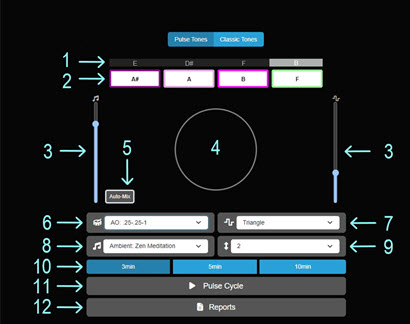
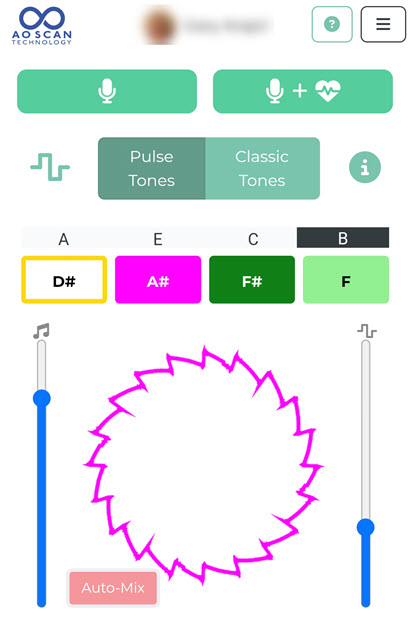
- Top 3 Frequencies and the Lowest Frequency. The first three frequencies are the ones that are the most out of range and the last one is the one being suppressed the most.
- Supporting Frequencies. You can play each Supportive Frequency individually or in combination by tapping each button with the corresponding note. (i.e., When each button appears solid, it means that the button is enabled.) These are the balancing tones.
There will be times when you conduct a scan and notice that one of the tones that was out of range is actually the balancing tone for another tone that is within range. Don’t worry about it. Your body will naturally apply these frequencies where they are needed, much like a mailroom operates. Imagine you throw all the mail into a large sorter, and it organizes the deliveries to the correct carriers. The same concept applies here: even though a particular frequency may be out of range in one area, it can still be essential for balancing another area. Pay attention to the tones that serve as your balancing frequencies; your body knows what needs to be done with them. - Left Slider controls the music volume. Right Slider controls the Supportive Frequency volume. These are volume controls for the Music and the Tones. Now what this does is different from Classic Tones. You are now able to mix the volumes. Whereas the Classic Tones were already premixed for you, these slider controls now allow you to bring the music and tones up a little bit more if you want, or to take them down a little bit more. This is just preference. If you take the Note volume all the way down and play just the Music, you just wasted your whole inner voice time because the magic is the notes, so you want to make sure you can hear the notes.
The Notes do not have to be dominant, but you have to be able to acknowledge that you can hear that note.
There is no right or wrong, just whatever is comfortable for you. - The circle in the middle (see Circle Figure below) visually represents the frequency being played. You do not need to view the frequency visualization, as it will not impact the inner voice scan. The circle is simply there to illustrate what the waveform looks like.
- The Auto-Mix feature will choose the Rhythm (6), Wave Type (7), Music (8), and Octave (9) for you based on the recorded voice’s Average Frequency and Pulse.
If you’d like the scanner to reevaluate you, simply hit the Auto-Mix button, and it will conduct another assessment. You can choose to go with the first scan or the second; neither option is better. There’s no right or wrong way to set these up—it’s all designed to make the experience more enjoyable for you. - Rhythm Selector: A value of 1 represents one beat in the current pulse (tempo), and a value of 3 represents three beats. For example, at a pulse rate of 82, there are 82 beats per minute, so a 1 would translate to 82 frequency pulses per minute, and a 3 would translate to 27 frequency pulses per minute.
You have five different sets of rhythms. (In Classic Pulse you were only provided the selection at the bottom, which is Constant.) These rhythms resonate with the cells. There is no right or wrong as far as how effective it is to you, but different rhythms may be more enjoyable to you on certain days.- Tesla 369: Research on Tesla 369 is the frequency that Tesla found that the cells resonate with in a very magical way. So, what basic what’s happening is those the frequencies that you’re listening to that are coming back to you are being delivered to you in three second burst, six second burst and 9 second burst, and then it will repeat that.
- 88: Eight second burst with a brief pause.
- 2-2-8: Two second burst, two second burst, eight second burst.
- 1-1-1-1: One second burst, one second burst, one second burst, one second burst.
- .25-.25-1: A quarter of a second burst, a quarter of a second burst and a one second burst.
- Constant: The frequency is being played the whole time. You’ve got your foot to the metal and you’re going as fast as that car is going to take you down the street.
- Select the Wave Type that you would like for the Supportive Frequency.
When you open that up you have 4 waveforms: Triangle, Square, SawTooth and Sine. Again, there is no right or wrong. In the Classic Pulse the Square wave was used exclusively. Use the waveform that will feel better to you with different pieces of music. - Select the Music to play with the Supportive Frequency.
This collection has the least to do with anything specific. These are simply different pieces of music intended to make listening to the tones more comfortable. The music is there solely to enhance your experience of listening to the tones. - Select the Octave that the Supportive Frequency will play at.
You have access to octaves 2, 3, 4, 5, and 6. Among these, octave 4 is considered the best, as it represents the middle range (i.e., middle C on the piano). You might sometimes find that you resonate more with one of the other octaves other than with octave 4. Regardless of the octave you choose, the information conveyed will remain the same. The difference will simply be in pitch: one will be lower, while the other will be higher. Choose the octave that feels right for you. - Choose the 5 Minute or 10 Minute button to play the audio; Continuous play is also an option.
- Tap the Pulse Cycle button to play the audio.
- Tap the Reports button to review your Inner Voice report. In your report, tap the email icon on the top right side of the screen to email the report, the audio, or both.
Average Frequency and Pulse Frequency
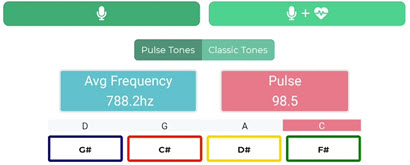
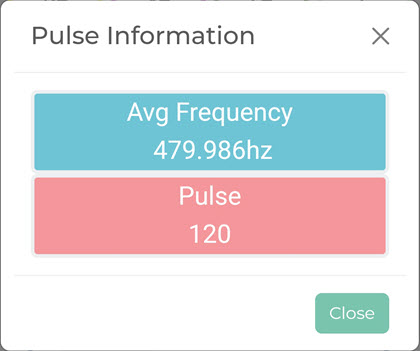
These are the frequencies of your voice. The Average Frequency is the average of all your voice frequencies. The Average Frequency is divided down into the Supportive Frequencies, that is, your Pulse Frequencies. These frequencies have very specific targets in our bodies.
Here’s an analogy: Think of your Average Frequency as a vast freeway. This freeway represents the carrier tone for everything delivered through your headphones. Each Supportive Frequency along this freeway acts like a car entering the on-ramps and exiting the off-ramps; they form your unique signature. Just like a fingerprint, this signature is exclusive to you. You’ll obtain a different Average Frequency and Pulse Frequencies every time you run an Inner Voice. This variability comes from the changes in your emotions. Even if you were to repeat the process immediately, it would likely result in a slightly different outcome. It could be dramatically different, influenced by your thought processes and how they affect your internal emotions at that moment.
As stated above, the Average Frequency is your freeway, and you’re pulled onto and off that freeway by the on-ramps and off-ramps, respectively. The different cars on the freeway are your Supportive Frequencies, and they’re going to get on and off that freeway.
- The Rhythm (Drum) [6] is your car’s suspension. You might have a really rough suspension, a smooth suspension, or a suspension that makes you feel like a boat driving down the freeway instead of a car with two bad shocks.
- The Waveform [7] will be more like the fuel you use in the car. Maybe you have 85 octaves, or you’re using 98 octaves. You’re going to experience a little smoother ride. It’s a little peppier, not as many pings.
- The Up and Down Arrow (Octave) [9] will be pretty much the speed you’re driving down that freeway. And if you stick it at 4, you’ll probably never get a ticket.
- Music [8] is what plays on the radio when you’re driving. No matter what music you pick, you will go from point A to point B. Your choice of music will make the ride more enjoyable.
Frequencies – Classic
The Average Frequency and Pulse frequency are displayed on the page when you perform the Classic Tones scan.
Frequencies – Pulse
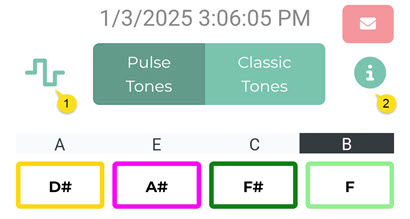
When you perform the Pulse Tones scan, the Average Frequency and Pulse frequency are not displayed on the page. However, by clicking the waveform icon [1], the Inner Voice scan page displays the Pulse Tones Information.
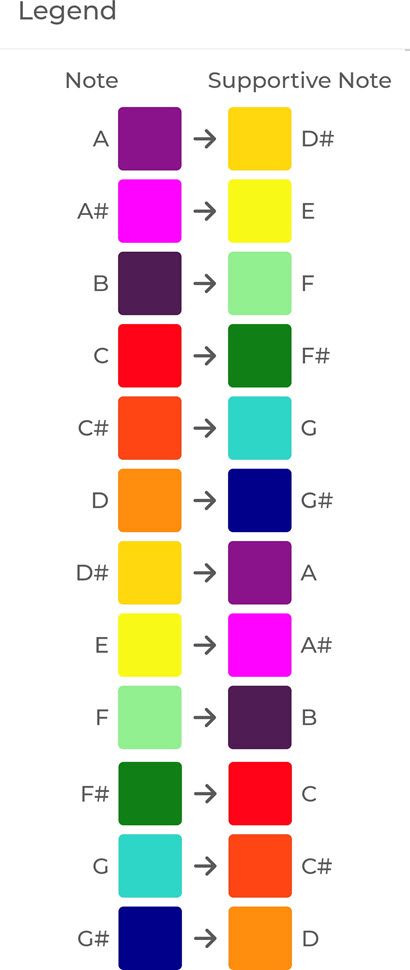
Clicking the information icon [2] displays the Pulse Tones Legend.
Legend
Each note (left) that is out of range, that is the tone being suppressed, has a corresponding supportive note (right) that will balance the suppressed tone.
Inner Voice Results
Report Without Vital Scan
The program will display the scan results under the Reports button and email the same information to the individual. (See the Inner-Voice Report without vitals for an example and the Inner Voice Report Without Vital Scan for an explanation of results.)
Report With Vital Scan
The program will display the scan results under the Reports button and email the same information to the individual. (See the Inner-Voice Report with vitals for an example and the Inner Voice Report With Vital Scan for an explanation of results.)
AO Inner-Voice Scan Audio Email
When you are presented with the Email Reports window, you have a number of choices to make on which reports will be sent to the client and what information will be included in the emails. If you choose to send the email containing the pulse audio files, then the AO Inner-Voice Scan Audio Email will be sent.
Additional Information
Here are some things learned from Dr. Daryl Roberts and on Facebook.
- Also, the person being scanned can count from one to 20 and say their ABC’s. (See Emotions)
- If you wanted to scan an infant, you could do so by just capturing their sounds.
“Inner Voice | Basic Training.” 2025. YouTube. YouTube. Accessed January 3. https://www.youtube.com/watch?v=qJK6fJvSl8U.
“How to Run an Inner-Voice Scan.” 2025. YouTube. YouTube. Accessed January 3. https://www.youtube.com/watch?v=ZB2mZziIUlU.
The featured image on this page is from the VectorVest website.
 Salubrious Sounds